
AI-powered business process automation solutions: Practical use cases for growing businesses
Winning more customers is good for business. The extra work that follows can be harder to plan for. A sales rep spends part of the day copying quote requests into the CRM. Someone in finance opens every supplier invoice to check which order it belongs to. Customers wait for answers that already exist in the company’s order system. As the business grows, those small delays start showing up in missed follow-ups, late approvals, and longer response times.
AI-powered business process automation solutions help when information arrives in one place and someone has to interpret it before work can continue somewhere else. AI can read a request or a document. The workflow around it can check the details, update the right system, and give a person the cases that need a decision.
Where does that make a difference in a growing business? Here are six everyday uses, from responding to a sales inquiry to preparing a weekly management report.
Where AI adds value to workflow automation
A fixed rule works well when the input is predictable. If a customer selects “Request a demo” on a form, the CRM can assign the request to a sales rep using the customer’s region. AI becomes useful when the same request arrives in ordinary language. A prospect might email, “We’re opening two more locations. Can someone show our managers how this would work?” AI can recognize the request for a demonstration and extract the detail about the new locations.
The distinction matters when you decide what to automate. Let AI interpret information that varies from one request to the next. Use business rules for things your team has already decided, like which representative owns a territory or which manager can approve a discount.
Six practical AI automation use cases for growing businesses
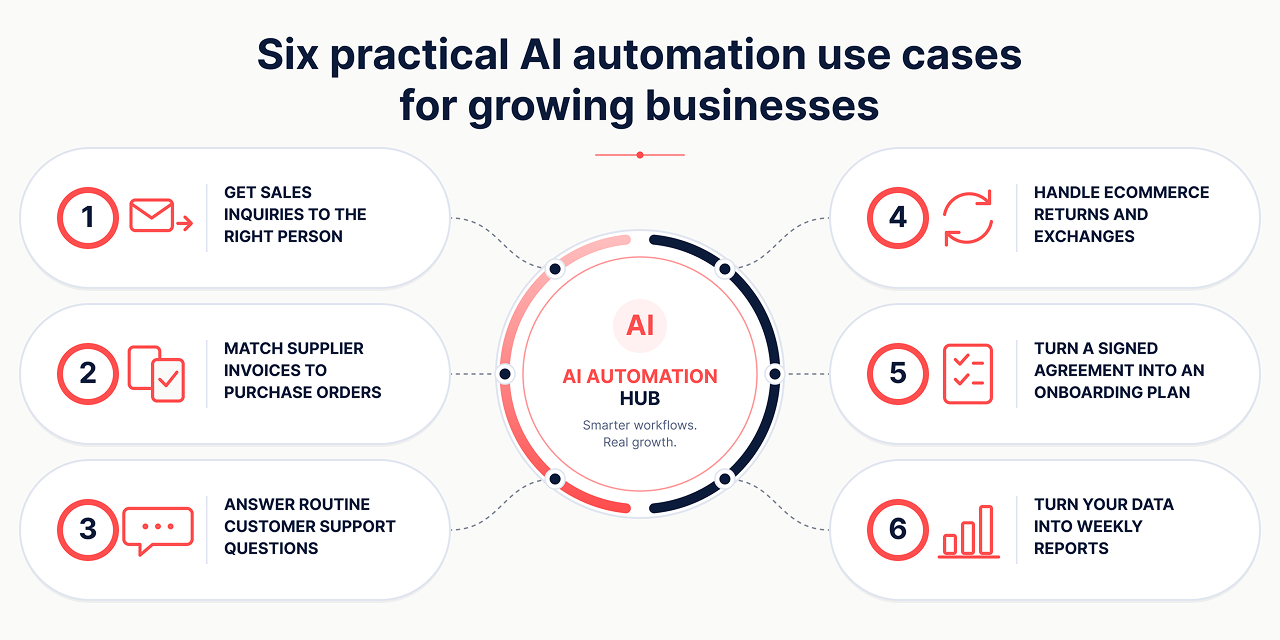
1. Get sales inquiries to the right person
A shared sales inbox can contain new opportunities, questions from existing clients, and supplier pitches. When one person sorts them all, a buyer asking for a quote may wait behind a dozen messages that do not need a sales response.
With sales process automation, AI can identify what the sender wants and pull out details such as product, quantity, and requested delivery date. The CRM checks whether the contact already exists, assigns the inquiry to its owner, and creates a follow-up task. If the buyer asks for a custom price, the rep sees the original request and can make that call. To judge whether the workflow helps, measure the time until a buyer receives a useful reply. An automatic acknowledgment alone tells you little.
2. Match supplier invoices to purchase orders
Suppliers put the same information in different places. A purchase order number may appear in the header of one invoice and in the notes on another. With AI invoice processing, the system can extract the supplier name, invoice number, order reference, and line items into a draft accounting entry.
The accounting system can then check the entry against the purchase order and goods received. If a supplier bills for 50 units but the warehouse records only 40, finance sees that difference alongside the original invoice. The reviewer can investigate the missing delivery before approving the entry. A useful pilot measure is how many invoices arrive ready for review without someone retyping the figures.
3. Answer routine customer support questions
“Has my replacement shipped?” is a short question that can take several minutes to answer. A support rep may have to find the original ticket, identify the replacement order, and look up its latest tracking update.
With custom AI agent development, a business can connect those lookups into one support workflow. After the customer’s identity and order are matched, the agent can draft a reply using the carrier’s latest update. If only a shipping label exists, the reply should say so. A missing tracking record or conflicting delivery status goes to a person with the relevant details attached. Track how often customers reopen the same question to see whether the replies actually resolve it.
4. Handle ecommerce returns and exchanges
A shopper writes, “The jacket fits, but I ordered the wrong color. Could I swap it for navy?” A standard return form may send that request down the refund route. AI can recognize that the shopper wants an exchange and identify the preferred color. The store can then check the original order, current inventory, and exchange policy before presenting an option.
For a retailer using Shopify, Shopify API integration can connect the storefront with the tools that support and warehouse teams use. Once the customer confirms the exchange, both teams can work from the same request. If navy is out of stock, a staff member can offer another color or a refund. The retailer can measure how many exchanges go through without asking shoppers to repeat information they already supplied.
5. Turn a signed agreement into an onboarding plan
In a service business, sales may know exactly what a new client bought while the delivery team receives only a signed PDF and a long email thread. The first onboarding call then goes into reconstructing commitments the client thought were already clear.
AI can pull the agreed services, start date, and named contacts into a draft handover, with a reference to the relevant passage for each item. The account owner checks the details before approval creates the project and assigns the first tasks. If a start date was discussed by email but never agreed in the contract, it stays open for confirmation. Compare how often project leads need to go back to sales for missing information before and after the change.
6. Explain the figures in a weekly operations report
A growing business may already have sales, order, and service dashboards. The time-consuming part is often writing the weekly explanation and looking up the records behind an unexpected figure.
Use reporting rules to calculate totals from the source systems, then give AI those verified figures to draft a short summary. If late deliveries rose from six to nine, the summary can flag the change and point to the affected orders. The operations manager can check whether one supplier caused the delay or whether the team simply handled more orders that week. That review keeps an unsupported explanation out of the report while saving the manager from building it from a blank page
How to choose the first process to automate
Start with a task employees can show you. Ask someone to walk through the last few examples, including one that went wrong. The strongest first project usually has a steady volume of work, a clear owner, and an outcome everyone can recognize. “Send complete quote requests to the right sales rep” is easier to pilot than “automate sales.”
Before building anything, record how long the work takes today. Suppose your team processes 300 invoices a month and spends eight minutes entering and checking each one. If a pilot brings the average down to three minutes, including exceptions, that frees about 25 staff hours a month. You can then compare the value of that time with the costs of setup, software, and ongoing review. Also check how many wrong entries slipped through. Saving five minutes is worth less if finance spends them correcting the books later.
How to connect automation to your existing systems
Decide which system owns each piece of information. The CRM may own customer contacts, the accounting platform may own invoices, and the warehouse system may own stock counts. The automation should read or update each record in the agreed place. Otherwise, a return marked complete by support might still appear open in the warehouse.
Volume matters, too. If hundreds of documents arrive together at month-end, cloud computing services can help you plan how much processing capacity to use, queue documents during busy periods, and monitor work that has stalled. Give each document a reference so a retry can resume the same job without creating a second accounting entry.
Thinkwik builds business process automation solutions that connect CRM, ERP, accounting software, and custom applications. To discuss a first project with our team, bring one recurring task, the systems it touches, and a recent example your staff had to fix. Those details give us a starting point for deciding what AI can handle, where an employee should review the work, and what a successful pilot would look like.